
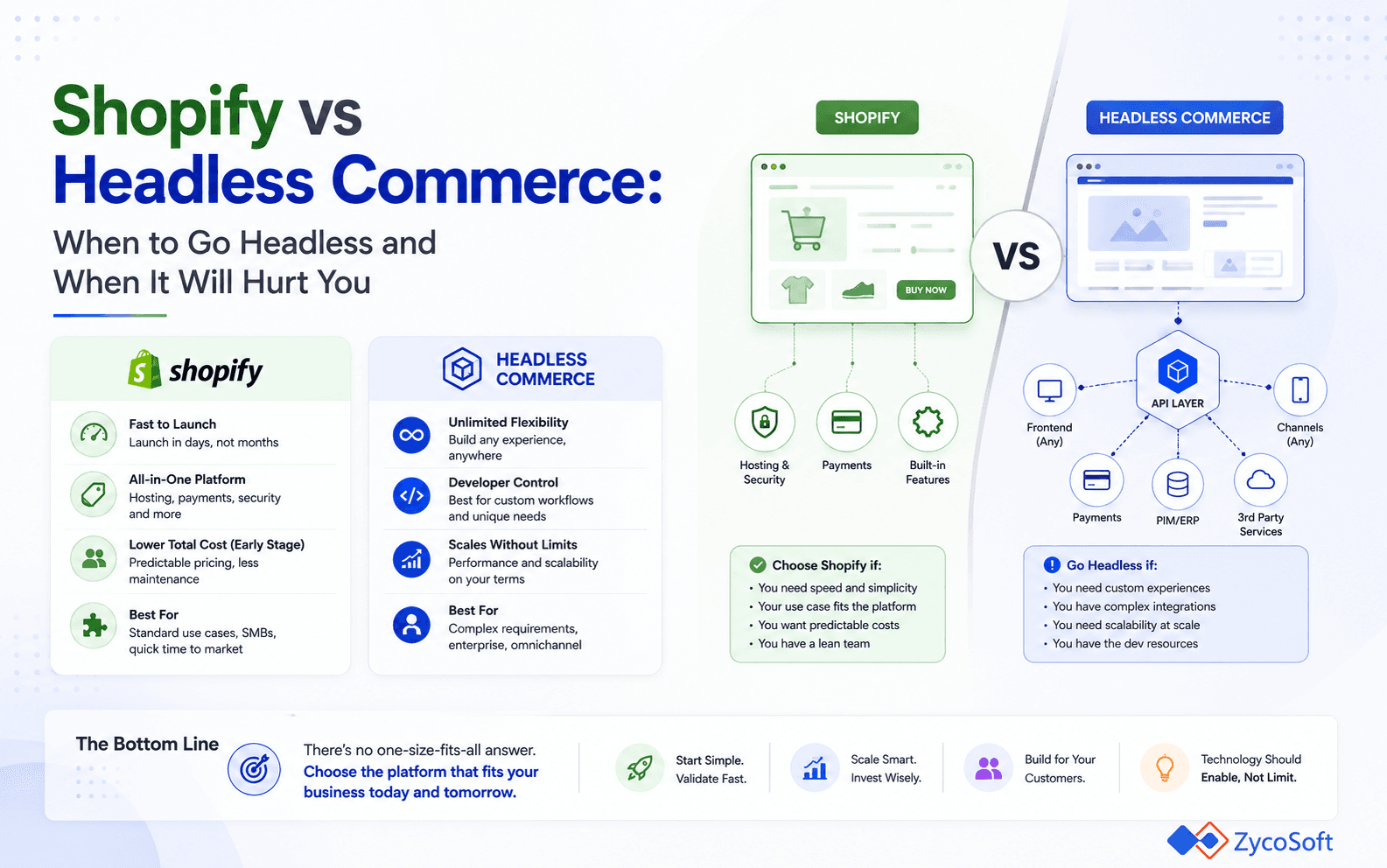
The question is not whether headless commerce is technically superior. In specific scenarios, it is. The real question is whether the problems it solves are the problems your store actually has. Committing to a decoupled frontend architecture adds engineering overhead, increases your operational surface area, and removes you from Shopify's managed upgrade path. That trade-off is worth making in a defined set of situations and genuinely damaging in most others.
This post is a practitioner decision framework for DTC founders, ecommerce CTOs, and engineering leads who are weighing Shopify vs headless commerce for a scaling store. It covers what each architecture actually delivers, the signals that make headless the right call, and the equally common cases where it adds complexity without meaningful payoff.
What the Architectures Actually Look Like in Production
Shopify's native storefront renders pages using Liquid templates, served through Shopify's own CDN. The platform manages hosting, caching, theme updates, and checkout. Your engineering work lives inside the Shopify admin and theme layer. The feedback loop from change to production is fast, and the operational surface area is deliberately small.
A headless setup separates the frontend entirely from the commerce backend. Your frontend application — typically Next.js, Remix, or Shopify's own Hydrogen framework — queries Shopify's Storefront API over GraphQL to retrieve product, cart, and collection data. The frontend is deployed independently, usually on Vercel, Netlify, or Shopify's Oxygen edge network. A headless CMS (Contentful, Sanity, or similar) typically handles editorial content in parallel.
A simplified architecture for a headless Shopify store looks like this:
- Frontend: Next.js or Hydrogen application, deployed to edge CDN (Oxygen or Vercel)
- Commerce data: Shopify Storefront API (GraphQL), handling products, cart, checkout redirect
- Content: Headless CMS via REST or GraphQL API, handling editorial pages, banners, and landing content
- Search: Algolia or Shopify Search API, integrated directly into the frontend
- Checkout: Shopify-hosted checkout (unavoidable on Shopify, even in headless configurations)
That final point is important. Even in a fully headless Shopify build, you hand the user to Shopify's checkout at the point of purchase. You cannot replace it with your own frontend on standard or Plus plans. Checkout Extensibility on Shopify Plus gives you UI customisation through Extensions and Functions, but ownership of the checkout rendering pipeline itself stays with Shopify.
When Headless Commerce Is Genuinely the Right Call
Headless ecommerce architecture earns its overhead when Shopify's native storefront is actively blocking a specific business outcome — not merely when it feels limiting. There are concrete scenarios where that threshold is met.
Multi-Surface Commerce
If your commerce layer needs to power a web storefront, a native mobile app, an in-store kiosk, and a B2B portal from a single product catalogue, a headless architecture is the correct choice. The Storefront API becomes a shared commerce primitive consumed by each surface independently. Building this cleanly in Liquid is not feasible. This is the clearest justified trigger for going headless.
Complex Editorial and Merchandising Requirements
Brands running content-heavy storefronts — where editorial teams need to build rich landing pages, campaign hubs, and localised content experiences — will hit the limits of Shopify's native content model quickly. Sections and metafields cover a lot of ground, but they are not a replacement for a purpose-built headless CMS with structured content modelling. If your editorial team is fighting the theme layer to do their job, the CMS integration case for headless is real.
Performance Under Specific Load Profiles
A headless frontend with server-side rendering and aggressive edge caching can deliver sub-200ms Time to First Byte on product and collection pages. That matters when you are running high-traffic product launches or flash sales where every 100ms of latency has a measurable impact on conversion. Shopify's CDN performs well, but a bespoke edge rendering strategy tuned to your traffic profile gives you more control over cache warming and cache invalidation timing.
Non-Standard Localisation and Multi-Market Architecture
Shopify Markets handles most standard multi-currency and multi-language scenarios adequately. But if you are running genuinely separate regional storefronts with different product ranges, pricing logic, tax treatments, and regulatory requirements across the UK, EU, and US simultaneously, the native Shopify multi-market model starts to show constraints. A headless frontend lets you route requests and assemble page content per market with considerably more precision.
When Going Headless Will Hurt You
The majority of DTC brands considering headless commerce do not have the problems headless solves. They have performance anxiety driven by benchmarks, or feature envy driven by what larger brands publish about their stacks. In those cases, headless adds cost and fragility without payoff.
Be direct with yourself about the following situations where staying on the native Shopify storefront is the better engineering decision:
Under 50,000 monthly sessions (as a rough rule of thumb): The performance delta between a well-built Online Store 2.0 theme and a headless frontend is negligible at this traffic level. A native theme with deferred script loading and optimised image delivery will score comparably on Core Web Vitals.
Small or part-time engineering teams: A headless stack requires ongoing frontend and infrastructure engineering. If you do not have the capacity to maintain a separate deployment pipeline, dependency updates, and CMS integration, the stack will degrade silently.
App-heavy stores: Most Shopify apps inject scripts into your storefront via the Script Tag API or App Blocks. These scripts travel into your headless frontend and undermine the rendering performance you went headless to achieve. What's more, App Blocks are tied directly to the Online Store theme layer and simply do not exist in a headless frontend — you would need to rebuild that functionality manually or find a headless-compatible alternative, which often does not exist. The app compatibility problem is frequently worse, not better, in headless configurations.
Short timelines or active growth phases: A headless build takes significantly longer to deliver than a theme-based store. If you are iterating quickly on product-market fit, the feedback loop cost of a headless architecture is a liability.
The honest comparison is this: a headless build costs two to four times more to deliver and carries materially higher ongoing engineering costs. That premium is defensible when the architecture unlocks revenue that the native stack cannot. It is not defensible as a technical aspiration.
Shopify Hydrogen vs a Custom Headless Frontend: Which to Choose
If the case for going headless is established, the next decision is whether to use Shopify Hydrogen or build a fully custom frontend against the Storefront API.
Hydrogen is Shopify's React-based framework built on Remix. It ships with pre-built cart primitives, product query hooks, and first-class Storefront API integration. Deployed on Oxygen, Shopify's edge hosting layer, it removes the need to manage your own CDN configuration or edge rendering infrastructure. A Hydrogen implementation is meaningfully faster to deliver than a custom Next.js build against the raw Storefront API, and Shopify maintains the framework actively.
Hydrogen v2 is now a mature, production-ready stack — not the experimental framework it was at launch. If you have been hesitant based on earlier impressions of Hydrogen, that hesitation is no longer warranted.
A custom headless frontend (typically Next.js with the Storefront API) makes sense in a narrower set of scenarios:
- Your team is deeply invested in Next.js and the App Router pattern and does not want to absorb Remix/Hydrogen conventions
- You need to deploy on infrastructure that Oxygen does not support, such as a self-hosted Kubernetes environment with specific data residency requirements
- You are combining Shopify with a non-standard commerce backend for specific product lines, and the frontend needs to query multiple commerce APIs without Hydrogen's opinionated data layer in the way
For most teams evaluating Shopify vs headless commerce for the first time, Hydrogen on Oxygen is the right default if headless is warranted. It is not a compromise; it is a production-grade choice that removes infrastructure work that most stores do not need to own.
A Decision Framework: Five Questions Before You Commit
Before committing to a headless architecture, work through this decision sequence. Answer each question with specifics, not hypotheticals.
1. What specific outcome is the native Shopify storefront blocking today? Name the exact feature or constraint. If you cannot, you do not yet have a headless use case.
2. Does that outcome require headless, or does it require a better theme, a Shopify Function, or a custom app? Shopify's extensibility model covers a large surface area. Exhaust it before assuming headless is the only path.
3. Who will own and maintain the frontend codebase? A headless stack without sustained engineering ownership becomes a liability within 12 months. Identify the person or team accountable before you start.
4. What is the full CMS integration plan? Editorial teams need a working authoring experience on day one, not a promise that it will be built later. The CMS integration is often the most underestimated part of a headless build.
5. Have you modelled the full cost, including ongoing maintenance? Factor in the initial build, CMS licensing, edge hosting, dependency updates, and the engineering time to keep the stack current. If the total is not justified by the revenue outcome in question one, the decision is made.
Final Thought
The headless ecommerce architecture decision is one of the most consequential — and most frequently mishandled — choices a scaling DTC brand makes. Going headless too early burns engineering budget on infrastructure instead of product. Staying on a native storefront too long blocks growth when the constraints are real.
The framework above is the right starting point. The answer is almost always specific to your traffic profile, your team's capacity, and the exact features you are trying to unlock. If you are working through this decision and want a direct technical conversation, get in touch with ZycoSoft.
Frequently Asked Questions
Shopify's native storefront renders pages using Liquid templates served directly from Shopify's CDN. A headless setup decouples the frontend entirely: a separate application (built in Next.js, Remix, or Hydrogen) queries Shopify's Storefront API via GraphQL and renders the UI independently. You gain frontend freedom but take on full responsibility for rendering performance, deployment infrastructure, and CMS integration.
It depends on what is limiting your current speed. A well-tuned Shopify Liquid store on the Online Store 2.0 framework can achieve strong Core Web Vitals scores. Headless gives you control over the full rendering pipeline, including server-side rendering, edge caching, and image optimisation strategies, but only converts to measurable speed gains if your current bottleneck is genuinely the rendering layer, not third-party scripts or bloated themes.
Hydrogen is Shopify's official React-based framework for headless storefronts, deployed on Oxygen, Shopify's own edge hosting network. It provides pre-built commerce hooks, cart primitives, and Storefront API integration out of the box. Use Hydrogen when you want headless flexibility without building Shopify data plumbing from scratch. Use a fully custom frontend only when you need infrastructure or framework choices that Hydrogen and Oxygen do not support.
Realistically, two to four times more expensive to build initially, and significantly higher to maintain. You are funding a separate frontend codebase, a CMS integration, edge deployment configuration, and ongoing engineering to keep the stack current. For most DTC brands under roughly 50,000 monthly sessions, the native Shopify stack with a performant theme and selective API extensions delivers comparable outcomes at a fraction of the operational cost.
Not straightforwardly. Shopify's checkout is locked on most plans, including Shopify Plus with Checkout Extensibility. You can customise the checkout UI using Checkout Extensions and Functions on Plus, but you cannot fully replace it with your own checkout frontend. If owning the complete checkout experience and payment flow is a hard requirement, you are likely looking at a custom commerce backend rather than Shopify headless.
Three mistakes appear repeatedly. First, underestimating CMS integration complexity: content editors need a working authoring experience from day one, not just an API. Second, neglecting cart and session state across CDN edge nodes, which causes inconsistent behaviour under load. Third, assuming headless automatically solves performance problems that are actually caused by third-party analytics and marketing scripts, which travel with the frontend regardless of architecture.